

Core Web Vitals in the AI Era: How Faster Web Applications Win Rankings, AI Visibility and Conversions
Your dashboards are clear: your rankings are slipping, your sessions are shorter. Your PageSpeed report is a wall of red. Your team is not weak; they are shipping features faster than ever. The real gap is that no one has handed you a diagnostic framework for which Core Web Vitals are failing, why and what level of intervention will fix them. This is where most web application development services fall short: they patch symptoms or pitch a rebuild neither of which answers the question you are actually asking: what is the smallest architectural change that restores performance and rankings without putting the roadmap on hold for nine months? That framework diagnosis first remediation second rebuild when justified is what this guide gives you.
Table of Contents
How AI Search Changed the Importance of LCP INP and CLS in 2026
Core Web Vitals stopped being a nice to have SEO signal the moment AI search surfaces started using them as a quality filter. Slow unstable pages are now deprioritized before a ranking algorithm even reaches relevance. For CTOs this means performance debt has crossed from engineering concern into risk every failing metric is a measurable cut to organic acquisition. Core Web Vitals now act as a gating signal for AI-driven search systems, not just a tiebreaker between ranking pages.
Generative search layers in Google, Bing and Perplexity prefer sources that load fast and respond predictably because their own latency budgets are tight. A page that fails LCP or INP is quietly skipped as a citation candidate before relevance scoring runs. This is a shift from the 2021 era, when Core Web Vitals influenced ranking but rarely decided it.
How Poor Core Web Vitals Quietly Reduce Organic Visibility and AI Citations
In 2026 the metric stack does three things at once:
- Search ranking signal: weak LCP and INP scores drag rankings down across the domain not just the failing page.
- AI citation filter: AI Overviews and answer engines bias toward sources that respond in under 200ms slow apps disappear from results entirely.
- User retention proxy: Google uses real-user field data, engineered lab scores no longer rescue a slow production experience.
The compounding effect is what catches CTOs off guard. A 400ms LCP regression does not just lose a position it removes the page from a category of surfaces it used to appear in.
The Real-World Cost of Performance Failure
The commercial penalties of poor performance are backed by real-world datasets across the global web ecosystem. Based on macro tracking metrics from the official Chrome User Experience Report (CrUX), only 49.7% of mobile origins successfully pass all three Core Web Vitals.
The Loading Bottleneck (LCP): According to live web analysis data, Largest Contentful Paint remains the hardest structural hurdle to clear, with over 31.7% of evaluated websites completely failing to hit the “Good” load threshold on mobile devices.
The Interaction Bottleneck (INP): Since its integration as a Core Web Vital replacing First Input Delay (FID), roughly 13% of websites fail to sustain healthy responsiveness profiles due to heavy client-side JavaScript execution.
Conversion Volume: Real estate tech platform QuintoAndro optimized its long-task JavaScript execution to slash site-wide INP latency by 80%, sparking an immediate 36% year-over-year surge in conversion rates.
Direct Sales Lift: In a controlled paid media split-test documented by Vodafone, delivering a version optimized to shave Largest Contentful Paint (LCP) down by 31% resulted in an 8% increase in completed digital sales and a 15% increase in total lead acquisition velocity.
| Core Web Vital | Good (Pass Threshold) | Needs Improvement | Poor (Failing Threshold) |
| Largest Contentful Paint (LCP) | < 2.5 seconds | 2.5s – 4.0s | > 4.0 seconds |
| Interaction to Next Paint (INP) | < 200 milliseconds | 200ms – 500ms | > 500 milliseconds |
| Cumulative Layout Shift (CLS) | < 0.1 | 0.1 – 0.25 | > 0.25 |
Detailed setup guides and grading methods can be reference-checked directly on the Google Search Central Core Web Vitals Documentation.
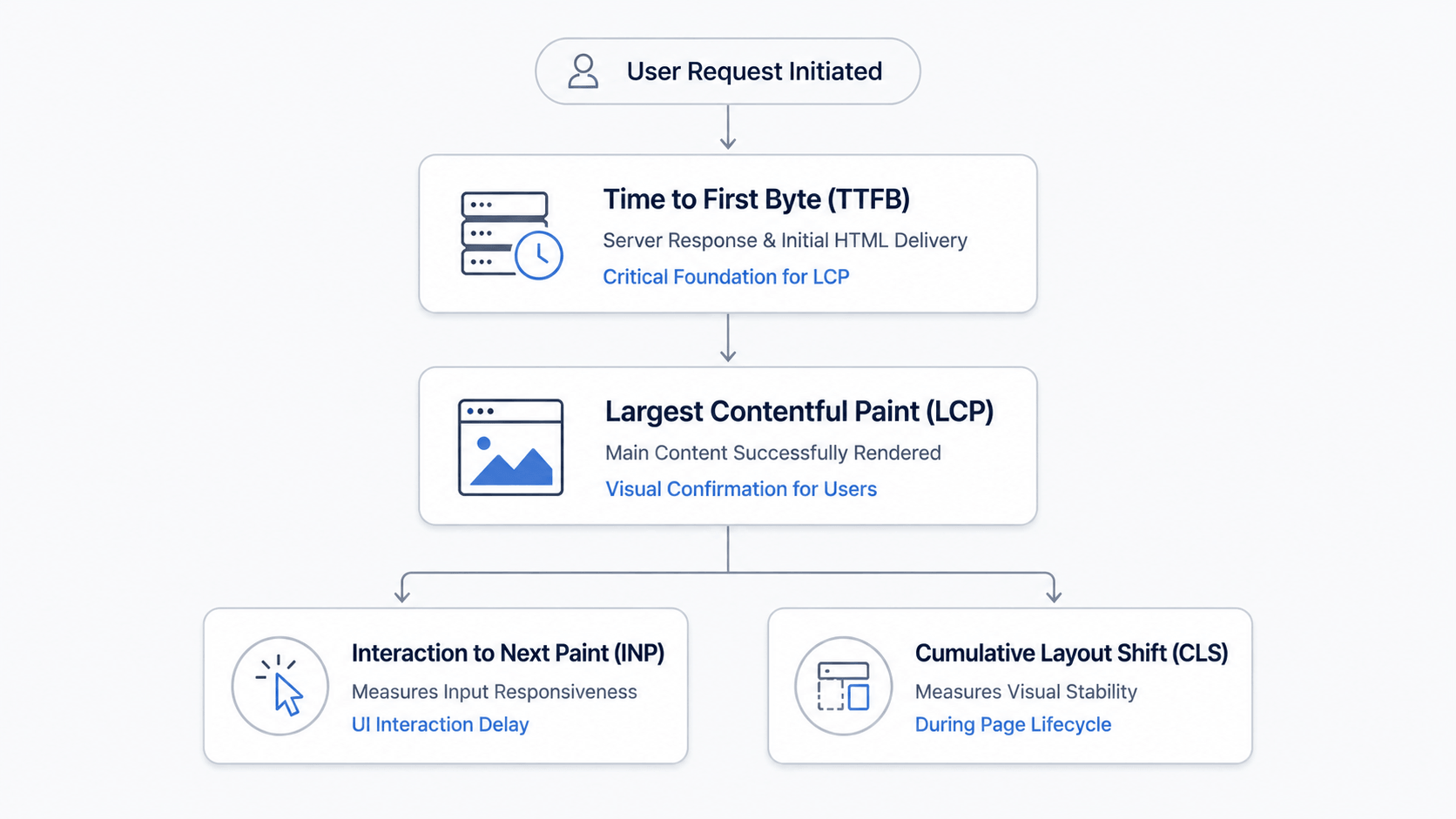
What LCP, INP and CLS Actually Measure And Why Each One Hurts Performance
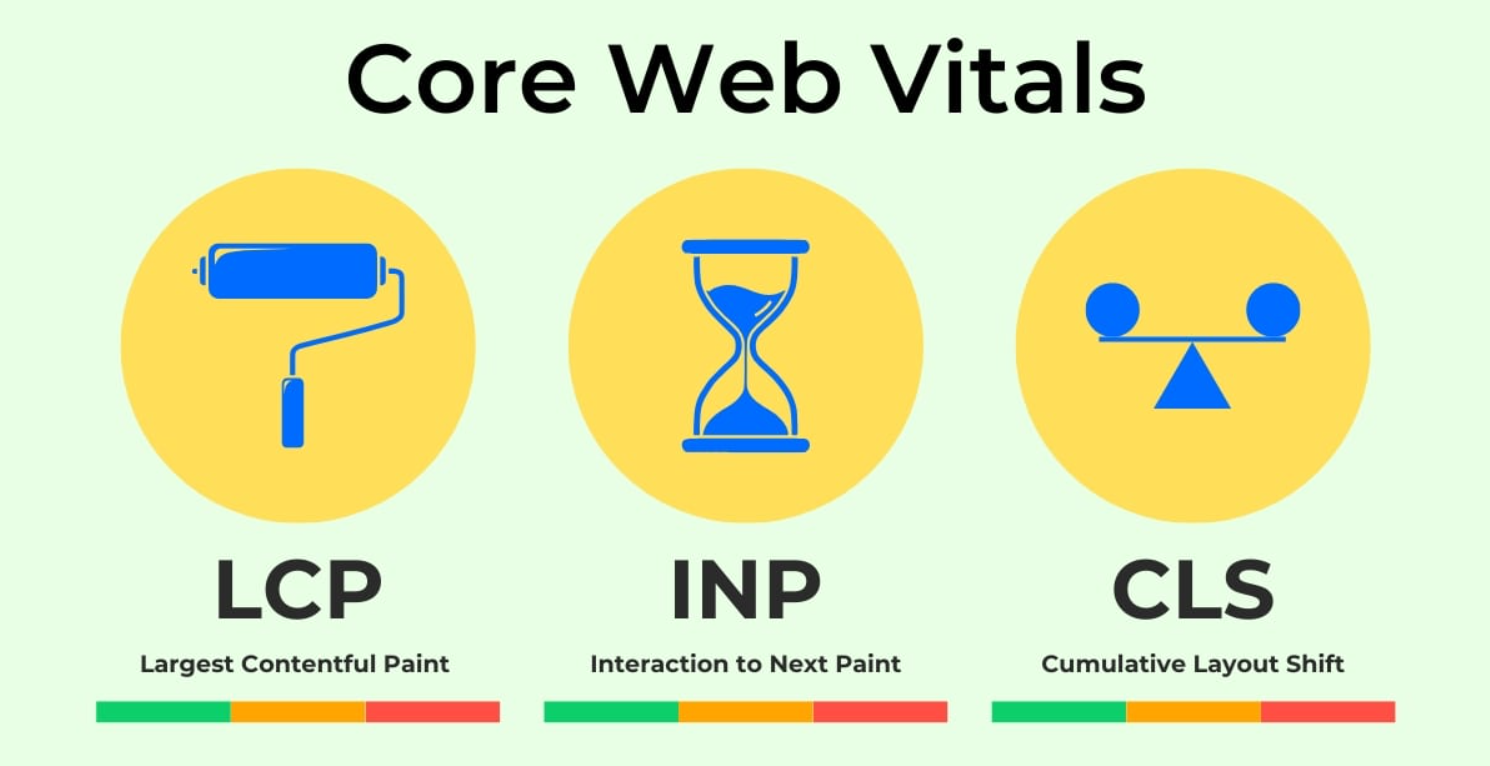
Most failing web applications fail on the same three metrics for the same three reasons and once translated out of engineering language the business impact becomes obvious. LCP loses you on the impression. INP loses you the interaction. CLS loses you the trust. Treating them as one problem is the common diagnostic mistake we see when teams approach Core Web Vitals optimization in 2026.
Each Core Web Vital maps to a commercial failure mode, which is why a single fix rarely repairs all three.
Largest Contentful Paint (LCP) is this page worth waiting for metric
It measures how long until the main content appears. Failing LCP means users leave before your value proposition renders. Business impact: organic CTR, weaker AI citation eligibility and higher bounce on paid traffic. Common cause: render-blocking JavaScript, hero media or server response times above 600ms.
Interaction to Next Paint (INP) the does this thing actually work metric
Source Image:- searchenginejournal.com
It measures responsiveness to clicks, taps and inputs. Failing INP means the page is loaded. Feels broken. Business impact: abandoned forms, dropped checkouts and a perception of low product quality. Common cause: client-side JavaScript blocking the main thread particularly in SPAs with poorly split bundles.
Cumulative Layout Shift (CLS) is the can I trust what I’m looking at metric
It measures stability as the page loads. Failing CLS means buttons move under the user’s cursor. Business impact: misclicks, support tickets and measurable trust erosion on high-intent pages. Common cause: images, late-loading ads and font swaps that reflow the layout.
Diagnosing which of the three is your bottleneck and which are downstream symptoms is where remediation starts.
The Architectural Decisions Quietly Breaking Core Web Vitals Across Modern Web Applications
Most Core Web Vitals failures are not coding mistakes, they are decisions made years ago that compound under modern traffic patterns. The framework choice, rendering strategy and third-party stack quietly determine whether your web application can pass LCP, INP and CLS thresholds without a rebuild. Identifying which decision is the bottleneck is the first job before any fix is scoped.
The Most Common Web Application Patterns Behind Poor LCP INP and CLS Scores
Source Image:- nebulainfotech.com
The architectural patterns that break Core Web Vitals are predictable once you know where to look and most web applications fail for two or three reasons, not twenty. The same root causes appear across audits in the US, UK and European mid-market regardless of industry.
- Client-side rendering as the default: SPAs that ship a HTML shell force the browser to fetch, parse and execute JavaScript before the largest element paints. LCP collapses immediately.
- Hydration overload on routes: Pages hydrating the component tree on load block the main thread for hundreds of milliseconds which destroys INP scores on first interaction.
- Unmanaged third-party scripts: Analytics, chat widgets, A/B testing and tag managers loaded in the head section add 400 to 800ms of blocking time before the page becomes interactive.
- Layout instability from late-loading content: Banners, ads and injected components without reserved space trigger CLS spikes that flag the entire page as unstable.
- Monolithic bundles served every route: Shipping a single 2MB JavaScript bundle to a marketing page that needs 80KB is the expensive mistake in mid-market web application development services.
Diagnosing which pattern is the constraint is what separates targeted full-stack web performance remediation from speculative rewrites.
Should You Optimize the Existing Stack, Migrate to Next.js or Rebuild Completely?
Every CTO with failing Core Web Vitals faces the fork: patch the existing stack, migrate to a modern framework or rebuild from scratch. The wrong choice burns the budget. Buys you the same problem twelve months later. The right choice depends on how deep the architectural debt runs, not on what your vendor finds easiest to sell.
Targeted Core Web Vitals Remediation vs Next.js Migration vs Full Rebuild
web applications need targeted remediation, a meaningful minority need a Next.js migration and very few need a full rebuild. Vendors who recommend rebuilds without measurement are protecting their backlog, not your roadmap.
| Path | Best Fit When | Typical Timeline | Primary Risk |
| Targeted remediation | Stable framework with isolated bottlenecks | 4–8 weeks | Performance ceiling remains |
| Next.js migration | Heavy hydration and SEO-critical SPA routes | 3–6 months | Mid-migration regression |
| Full rebuild | Framework end-of-life and deep architectural debt | 9–18 months | Major opportunity cost |
Common mistakes buyers make: accepting a rebuild quote without a measured baseline treating Next.js as a silver bullet for INP without addressing third-party scripts and signing offshore vendors who promise all three paths at the same price.
How to Evaluate a Core Web Vitals Optimization Partner Without Getting Sold the Wrong Solution
The vendor selection stage is where most CTOs lose control of the budget. Performance work attracts two kinds of partners: those who measure before they recommend and those who quote a rebuild before they have seen your repository. Knowing which signals separate them protects your roadmap.
Vendor Red Flags vs. Signals of Real Engineering Depth
A serious performance partner refuses to scope work until they have measured your application against field data, not lab scores. That single behavior separates engineering depth from sales theater across the US, UK and European delivery markets.
- Red flag rebuild recommended before audit: Any vendor proposing a rewrite without reviewing your Real User Monitoring data is selling capacity, not expertise.
- Red flag generic Lighthouse screenshots: Lab scores ignore device, network and user conditions. CrUX field data is the only metric Google ranks on.
- Signal route-level diagnostic deliverable: Strong partners produce a per-route LCP, INP and CLS breakdown before quoting remediation scope.
- Signal willingness to scope a fix without a migration: Partners confident in their engineering recommend the viable intervention first.
- Signal measurement plan tied to outcomes: Performance gains tied to ranking recovery, conversion lift or bounce rate, not vanity metrics.
Conclusion
Core Web Vitals optimization in 2026 is a problem before it is an engineering one. The web applications that recover rankings are not the ones that rebuild, they are the ones whose CTOs demanded a baseline, scoped the smallest intervention that moved the metric and refused vendors who confused activity with progress. The right web application development services partner proves the path with field data, not deck slides.
If failing, Core Web Vitals are pulling your rankings down. A full rebuild is not justified, starting with a measured architecture review that scopes only what the data demands.
FAQs
1. Can we fix failing Core Web Vitals without migrating to Next.js?
Yes, most LCP and CLS failures can be fixed inside your framework through rendering changes, image strategy and third-party script discipline. Next.js migration becomes necessary mainly when INP failures trace back to hydration costs, on SPA architectures.
2. How long does Core Web Vitals remediation typically take on an existing web application?
Targeted remediation usually takes four to eight weeks to see some improvement in the field data. If we are talking about doing a migration to Next.js that can take anywhere from three to six months. This really depends on how many routes we have and how complicated the integration is. If someone says they can do it in under two weeks it is probably a quick fix that will not last.
3. What happens to our Google rankings after we fix the LCP INP and CLS issues?
Our Google rankings will probably get better within four to twelve weeks after we get some field data from CrUX.. This only works if our content and backlinks are still good. Just because we improve our performance does not mean we will rank higher. If we do not meet the Core Web Vitals requirements it can actually hurt our rankings. So performance is one part of the equation but it is an important one. If our pages are good but our performance is bad it can keep them from ranking
4. Should we handle performance work on our own? Get some outside help?
It is usually faster to get some help if we have not dealt with these kinds of problems before. This is because external partners have a lot of experience and can use that to help us. They have worked on a lot of projects and can bring that knowledge to the table. Once we have a plan in place it is probably better to handle the maintenance on our own. Getting an outside audit can be really helpful, in figuring out where we are and what we need to do to improve our performance. Next.js migrations and performance work can be complicated. It is good to have some outside help at first.
John is a professional technology writter with over 8+ years. He is passionate about writing and sharing insightful content on artificial intelligence (AI), AI tools, web tech, programming, tech gadgets, and emerging technologies. His goal is to help readers stay informed about the latest innovations, industry trends, and practical solutions that drive business growth and digital transformation.