
How to Restore a Snapchat Streak for Free
You open Snapchat and the flame next to your best friend’s name is gone. Just like that, 200 days of daily snaps, vanished over one forgotten photo.
Take a breath. In a lot of cases, you can get it back, and you don’t have to pay or download anything sketchy. The catch is that the clock is already running.
Here’s exactly what to do, what the screens look like, and what to skip.
The Quick Version
- Open the chat with the friend whose streak broke.
- Look for a Restore button next to their name.
- Tap it, confirm, and wait for the “Restored!” message.
- No button? Submit the official Snapchat Support form.
- Never use a third-party “streak restore” site or app.
Quick take: Speed matters more than anything else. Check the app the moment you notice.
What Counts as a Snapstreak?
A streak starts when you and a friend trade snaps (not text chats) for three days in a row. A flame appears, plus a number showing your day count.
To keep it alive, you both have to send a snap within every 24-hour window. Miss it on either side and the streak ends.
A few things don’t count. Text-only chats, Stories, and group snaps won’t keep it going.
Snapchat also gives you a warning. An hourglass emoji appears when your window is about to close, so if you see it, send a snap right away.
Bottom line: One snap each, every day, directly to each other. That’s the whole rule.
Method 1: Use the In-App Restore Button
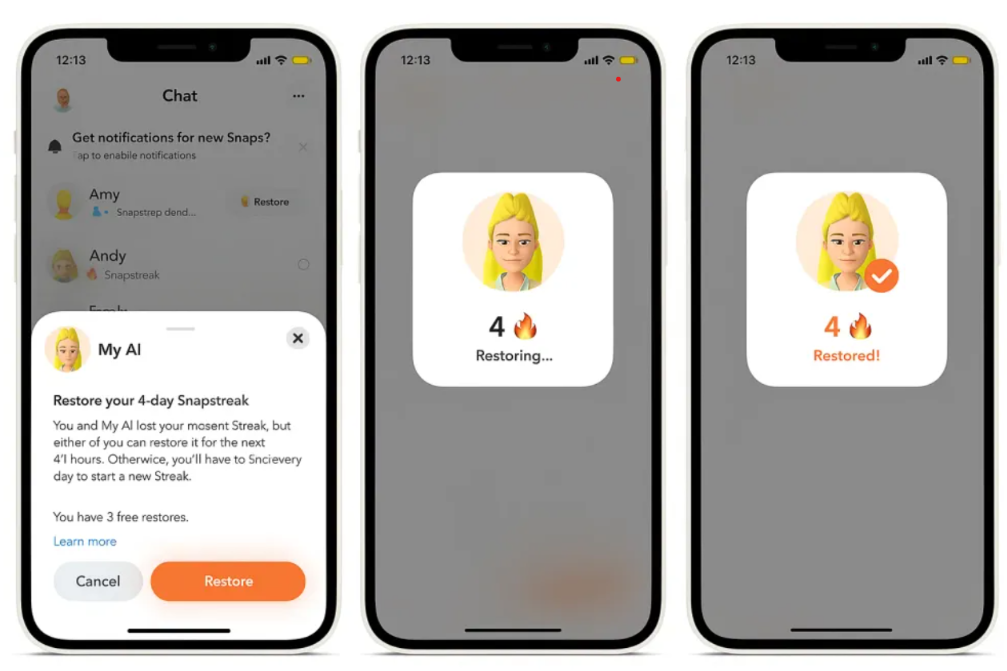
This is the fastest and easiest route, and it’s the one most people end up using.
When a streak ends recently, Snapchat shows a Restore button right in your Chat feed, next to your friend’s name. You don’t need to dig through menus.
Here’s what happens, based on the screens in the image above:
- Open Chat and find the friend whose streak ended.
- Tap the Restore button beside their name.
- A pop-up asks if you want to restore your streak. It shows your streak length, how long you have to act, and how many free restores you have left.
- Tap Restore to confirm.
- You’ll see a “Restoring…” screen, then a “Restored!” screen with your number back.
That’s it. The whole thing takes about ten seconds.
How Many Free Restores Do You Get?
This is where it gets a little messy. The pop-up in the screenshot says you have 3 free restores. That number isn’t the same for everyone.
Snapchat changes these rules over time, and the allowance can differ by account, country, and whether you subscribe to Snapchat+. Different guides report different numbers, and some say free accounts get a single restore.
Here’s what’s consistent across most sources:
- Free accounts usually get a limited number of free restores.
- Snapchat+ subscribers typically get more.
- After your free ones run out, the app may charge a small fee per restore, and the price varies by region.
The easiest way to know your own number is to tap Restore. The pop-up shows how many you have left before you confirm anything.
Method 2: Contact Snapchat Support
Missed the button? Don’t give up yet. The support form is still free, and it’s officially supported.
- Go to help.snapchat.com.
- Open My Account & Security, then Snapstreaks.
- Find the article about a lost Snapstreak and open the support form.
- Enter your username, your email, your friend’s username, and roughly how long the streak was.
- Describe what went wrong and submit it.
Be specific and honest. If the app crashed, your phone died, or you had no signal, say so. Support is more likely to help when something technical got in the way.
Method 3: Snapchat+ Restore Credits
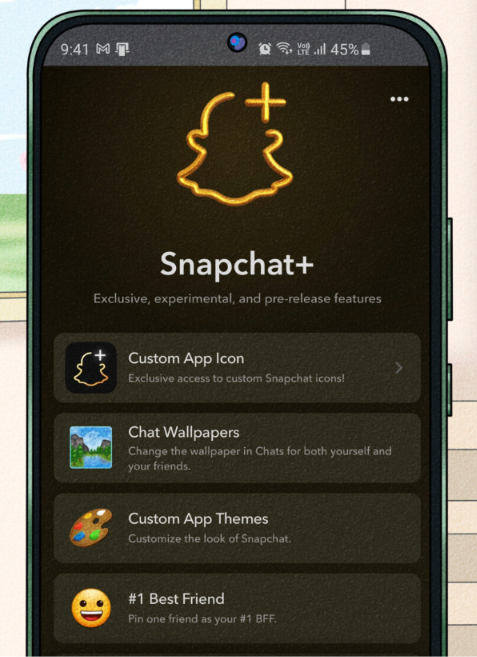
Snapchat+ is the paid subscription, so this one isn’t free. But it’s worth mentioning because it comes with extra restores.
Subscribers can usually restore streaks in the same in-app way, with a bigger allowance than regular accounts. If you lose streaks often, or you’re protecting a very long one, it may be worth a look.
To check, tap your Bitmoji, open Snapchat+, and see what’s included in your region.
Never Use Third-Party Restore Tools
Search for this topic and you’ll see sites promising “instant streak recovery” or “unlimited free restores.” Stay away from all of them.
Snapchat doesn’t allow outside tools to restore streaks. These sites usually want one of three things: your login details, a download, or a payment.
Here’s what can go wrong:
- They steal your password and take over your account.
- They install junk on your phone.
- Snapchat locks or bans your account.
The rule is simple. If it’s not inside the Snapchat app or on help.snapchat.com, don’t trust it.
If you want to understand how these scams work, it helps to know a bit about how AI is used in cybersecurity, since a lot of fake tools now use AI-written pages to look legit.
Why Did the Streak Break in the First Place?
Sometimes it’s your fault. Sometimes it isn’t. Common causes include:
- You forgot, or you thought a text chat counted.
- Your friend missed their snap.
- The app crashed or glitched mid-send.
- Bad Wi-Fi stopped a snap from delivering.
- Your phone died or you were offline for a day.
If your app keeps freezing or closing on its own, that’s worth fixing, since it can quietly break streaks. This guide on fixing apps that keep crashing on Samsung phones walks through the usual causes.
Bottom line: If it was a glitch, say so in your support request. It helps.
How to Stop It From Happening Again
Restoring is a rescue. Prevention is easier.
- Set a daily alarm. Pick the same time every day and treat it like a habit.
- Send a quick snap. It doesn’t need to be a good photo. A blurry shot of your desk works fine.
- Watch for the hourglass. It’s your last-chance warning.
- Turn on notifications. Let Snapchat nudge you when time is running low.
- Warn your friend. If you’ll be traveling or offline, send a snap ahead of time.
A reminder tool can help too. If you like automating your day, take a look at Reclaim AI for scheduling, or browse these AI tools for social media to keep your accounts organized.
Bottom line: A 10-second daily habit beats any restore button.
Common Mistakes
- Waiting too long. The restore window is short.
- Sending a text chat. Only snaps count.
- Trusting “free restore” websites. They’re a fast way to lose your account.
- Restoring over and over. Treat it as an emergency fix, not a routine.
FAQs
Can I really restore a streak for free?
Often, yes. The in-app button and the support form are both free. How many free restores you get depends on your account, so check the pop-up.
What if I don’t see the Restore button?
The window has probably closed. Try the support form, and explain what happened.
Will my friend know I restored it?
The streak simply comes back in the chat for both of you, so they’ll see it return.
Is it safe to use a streak restore app?
No. Snapchat doesn’t allow them, and many are built to steal logins.
How fast do I need to act?
As fast as you can. The button only appears for a limited time after a streak ends.
Final Take
Losing a streak feels worse than it should, but you usually have a way back. Open the chat, tap Restore, and confirm. If the button’s gone, send the official support form. Skip everything else.
After that, set a daily reminder so you never have to do this again.

Vivek Asrani is a tech writer and AI tools reviewer who has been consistently transforming complex technology into user-friendly stories that readers look forward to. His over a decade of experience in the IT content space allows him to impart useful information on AI tools and digital products he has practically used with a sharp eye for real-world value. His reviews are written to ensure that readers see what a tool can actually do before they think of buying and spending time on the tool. He concentrates on clarity and practical details that make technology effortless to trust and use.