
Figma vs Canva: Which Design Tool Should You Use in 2026?
Choose Canva if you need polished social posts, presentations, videos or print pieces fast, and your team includes non-designers.
Choose Figma if you design products, websites or apps, or need a shared design system that keeps a team consistent at scale. Many teams end up using both: Figma for the brand system, Canva for day-to-day production.
The two tools solve different problems, even though both run in the browser and both now lean heavily on AI.
What each tool is built for
Figma
Figma started as a collaborative interface design tool and has grown into a family of products. It now spans FigJam for whiteboarding, Figma Slides for presentations, Figma Draw for illustration, Figma Sites for publishing, and Figma Buzz for on-brand marketing assets. Its core strength is precision: components, auto layout, variables, prototyping and developer handoff.
Canva
Canva is built around speed and accessibility. You start from a template, swap in your content and export. Its Magic Studio bundles AI tools alongside Sheets, Canva Code, Video 2.0 and the Affinity professional suite, and Canva AI 2.0 lets you describe a design in conversation and get editable objects back.
Figma vs Canva at a glance
| Figma | Canva | |
|---|---|---|
| Best for | UI/UX, product and web design, design systems | Social media, presentations, marketing assets, video |
| Learning curve | Steeper; designers get the most from it | Gentle; usable in minutes |
| Starting point | Blank canvas, components, libraries | Templates and stock assets |
| Developer handoff | Strong (Dev Mode) | Not the focus |
| Brand control | Component libraries and locked layouts | Brand kits and approval workflows |
| Free plan | Yes (limited files) | Yes |
Design philosophy: precision vs speed
Figma gives you a blank canvas and powerful structure. You build reusable components, define variables for color and spacing, and update a single source of truth that flows through every file. This is why product teams rely on it. It rewards investment in setup.
Canva flips that tradeoff. You get a huge template and asset library, drag-and-drop editing, and one-click exports. You give up some fine control but gain speed, especially for people who are not trained designers.
Collaboration and brand consistency
Both tools support real-time collaboration, but they protect brand consistency differently.
- Figma enforces consistency through design systems: shared component libraries, variables and, with Figma Buzz, locked layouts that let marketers edit approved areas without breaking the brand.
- Canva enforces it through brand kits, approval flows and admin controls, which suit teams where many non-designers create content.
If your problem is “ten people are producing assets and they all look different,” either tool can solve it. Figma suits it when a design team owns the system. Canva suits it when marketers need to move without waiting on designers.
AI features
Both platforms are racing on AI.
Figma launched an AI agent in Figma Design on May 20, 2026, letting users generate and edit designs with natural language prompts. It also introduced “Code to Canvas” in February 2026, which converts code generated in AI tools into editable Figma designs. One thing to watch: Figma began enforcing seat-level AI credit limits in March 2026, so heavy use of Figma Make and other AI features can hit a monthly ceiling.
Canva’s AI is built around making design accessible: text-to-design, image generation, background removal and conversational editing, all bundled into its plans.
The practical difference is that Figma’s AI aims to speed up professional design and prototyping work, while Canva’s aims to remove the need for design skills.
Pricing
Pricing for both tools changes often and varies by region, so confirm current numbers on each official pricing page before budgeting. As of mid-2026, third-party trackers report the following.
Figma
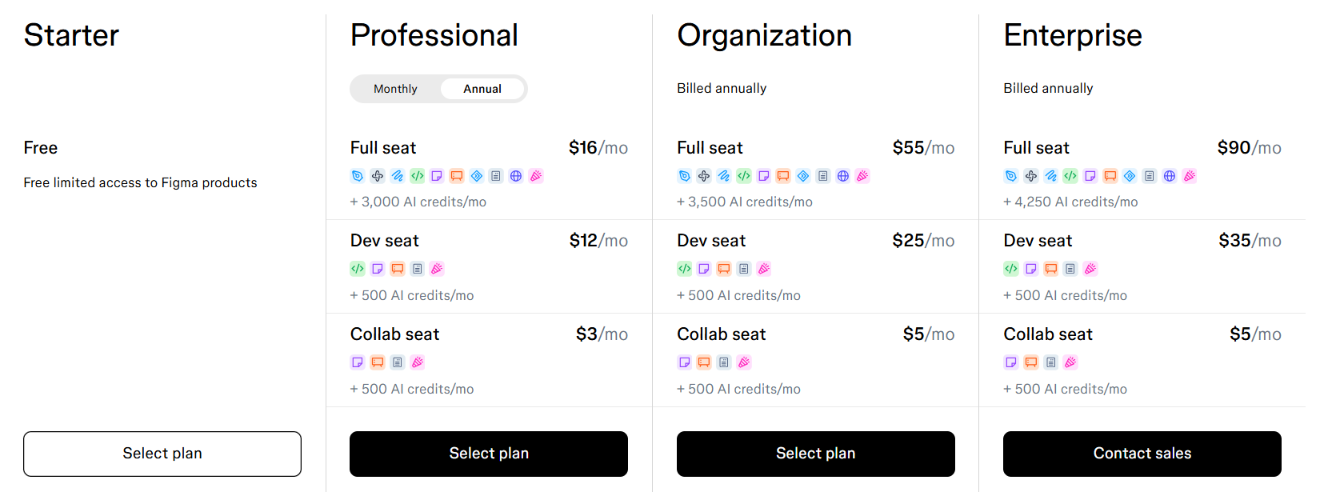
Figma prices by seat type. Professional Full seats start at $16 per month on annual billing, or $20 monthly, with Dev seats at $12 and Collab seats at $3. Organization is $55 and Enterprise $90 per Full seat, billed annually only. Auditing who needs a Full, Dev or Collab seat is the easiest way to avoid overspending.
Canva
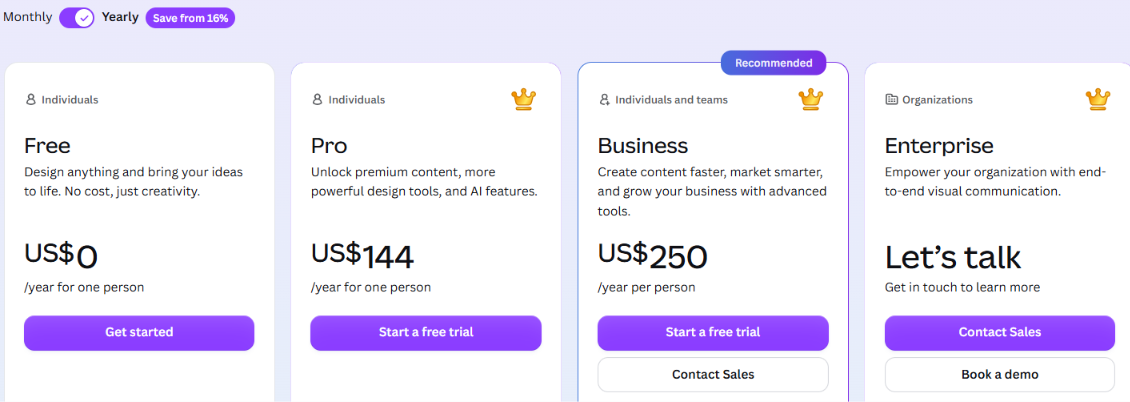
Canva’s paid plans are simpler. One September 2026 review of Canva’s US pricing page lists Pro at $144 per year and Business at $250 per person per year, and notes that Canva Teams is no longer available to new sign-ups. Annual billing lowers both. Other trackers list different figures, which is a good reminder to check the live page.
For a solo non-designer, Canva is usually cheaper. For a design team, Figma’s seat model lets you pay full price only for the people who truly design.
Which one should you choose?
Choose Figma if you:
- design apps, websites or SaaS interfaces
- need developer handoff and a maintained design system
- have trained designers who want precise control
Choose Canva if you:
- produce social posts, decks, flyers, videos or print materials at volume
- work with non-designers who need to create on-brand content quickly
- want templates and stock assets built in
Use both if you:
- build a brand system in Figma and want marketers to produce campaign assets in Canva
- need product design and high-volume marketing content in the same company
Final verdict
Pick the tool that matches the work, not the one with the longest feature list. If your output is screens, components and systems, use Figma. If your output is campaigns, posts and presentations made by a mixed team, use Canva. If you do both, run both and let each do what it does best.
Frequently asked questions
- Is Figma better than Canva?
Neither is better overall. Figma is better for product and interface design, and Canva is better for fast marketing content.
- Can Canva replace Figma?
For most UI/UX and design-system work, no. For social graphics, presentations and simple web visuals, often yes.
- Is Figma harder to learn than Canva?
Yes. Canva is usable within minutes, while Figma takes longer to learn but gives designers far more control.
- Do both have free plans?
Yes. Both offer free tiers with limits, so you can test them with real work before paying.
John is a professional technology writter with over 8+ years. He is passionate about writing and sharing insightful content on artificial intelligence (AI), AI tools, web tech, programming, tech gadgets, and emerging technologies. His goal is to help readers stay informed about the latest innovations, industry trends, and practical solutions that drive business growth and digital transformation.