What Is Dreamina AI?
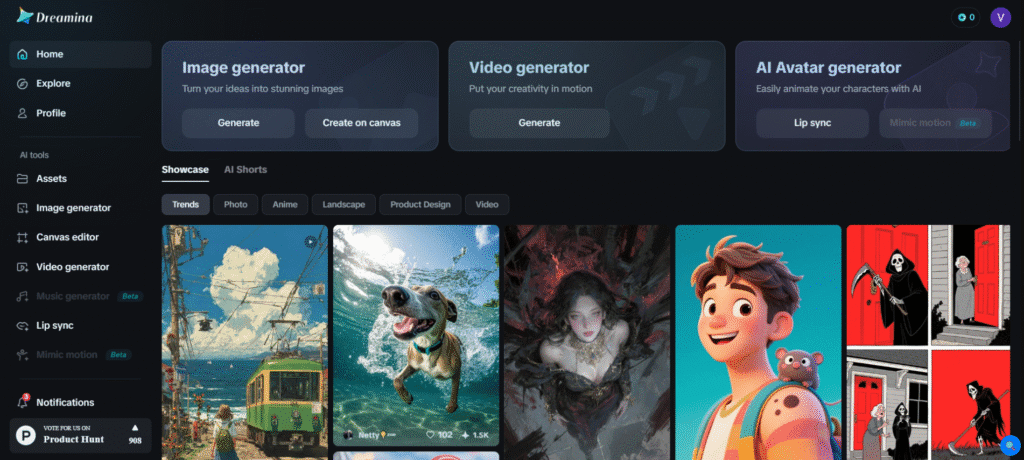
Dreamina AI is an inventive, user-friendly tool that creates stunning images. You have the option to enter a text description or utilize an already existing image to generate entirely new artwork. This is ideal not only for artists and designers but also for anyone who wants to be innovative and have no professional skills at all. Just let your imagination flow and enjoy the ride of visualizing your ideas into attractive images.
Key Features of Dreamina AI
- Text-to-Image Generation: Give a simple description, and Dreamina will produce an image out of it. It is excellent for making art, designing characters, creating backgrounds, or making pictures for marketing.
- Transformation from Image to Image: A photo can also be uploaded, and a text prompt can be used to alter its appearance. The background, style, or general aspect may be modified to suit your concept better.
- Multi-Layer Editing: The canvas lets you mix different AI-made parts together. You can also use tools to erase, expand, or fix parts of the image with more control.
- Diverse Application Support: Dreamina is helpful for many creative jobs like designing characters, fashion looks, game art, advertisements, and product photos.
Who Can Use
- Content creators are developing engaging visuals for social media platforms.
- Game developers design game elements and character assets.
- Marketing professionals are creating compelling imagery for advertising campaigns.
- Educators produce visual materials for teaching and presentations.
Pros & Cons
Pros:
- You may do a lot of creative activities that can be drawing characters, or game art with it.
- It is user-friendly, whether you are a beginner or not.
- It produces pictures that are clear, cool, and professional.
Cons:
- It requires a high level of time to master.
- It has shortcomings in integrations with other applications and tools; it is regularly used as a separate application.
- It consumes a lot of resources; therefore, a strong device is the only one that will be able to execute it without any inconveniences.
Pricing
- Free Plan: $0 per month. Came with 225 free daily bonus credits and low access to simple functions.
- Basic Plan: $18 per month will provide you with 1010 credits, which is applicable to 505 images or 42 videos. It does away with the watermark, enables the expansion of the length of videos, gives them increased resolution.
- Standard Plan: $42 a month will provide you with 4,040 credits, and you are also allowed to access all the features that the Basic plan offers, with the increased usage limits.
- Advanced Plan: $84 per month for 13,110 credits, includes all Standard features with the best value per credit.
The prices may not be up-to-date, and therefore, to have the most details, the most current and updated one, please refer directly to the Dreamina site.
FAQs
Q1: Is Dreamina AI free to use?
You may sign up for Dreamina AI’s free plan, which gives you basic daily credits (225 tokens per day). Nonetheless, the outputs from free accounts are watermarked. The paid plans, on the other hand, not only offer watermark-free outputs but also come with more features.
Q2: What file formats does Dreamina support?
Dreamina works with standard image formats like JPG and PNG. It also supports MP4 for videos. The quality of your downloads depends on your subscription plan. Higher plans give you more resolution options.
Q3: Can I use Dreamina AI for commercial projects?
Indeed, if you are on a paid plan, you will have the commercial rights over the output. The free plan may have some limitations, so it is always better to verify the terms before applying it for commercial purposes.
Q4: How does Dreamina compare to other AI image generators?
Dreamina, unlike others, has the unique feature of integration with CapCut, video generation, and talking avatars, which makes it more advanced than just simple text-to-image generation.
Q5: What makes Dreamina’s video generation unique?
Dreamina offers both text-to-video and image-to-video conversion with camera control, motion speed adjustment, and frame interpolation for smooth, natural-looking animations.